Software Testing Tools for Enterprise Applications
Automate functional, performance, GUI, unit, integration and continuous testing across modern applications, embedded software and enterprise workflows.
Choose testing solutions that connect development, QA and engineering teams with repeatable automation, CI/CD integration, test execution, reporting and quality visibility.

What Are Software Testing Tools?
Software testing tools are platforms, frameworks and utilities used to plan, automate, execute, analyze and report software tests. Enterprise testing programs commonly use different tools for functional automation, performance and load testing, API testing, GUI testing, unit and integration testing, regression testing, code coverage and continuous testing in CI/CD.
Why Enterprises Use Automated Software Testing Tools
Testing at enterprise scale requires repeatability, speed, coverage and evidence across applications, releases and development pipelines.
Repeatable regression testing
Run the same critical test scenarios consistently across builds and releases instead of relying on manual repetition.
Faster release validation
Automate test execution and reporting so QA teams can validate changes earlier in the delivery cycle.
Performance visibility
Measure response time, throughput, concurrency and system behavior under expected and peak workloads.
Developer-level quality
Test units and integrations earlier with coverage, diagnostics and automated feedback within engineering workflows.
Enterprise Testing Solutions for Specific Use Cases
Targeted testing capabilities help teams match the testing method to the application, technology stack and delivery stage.
Enterprise Performance Testing Tools
Performance testing tools help teams validate applications, APIs, microservices and distributed systems under realistic workloads.
- Load testing for web applications and APIs
- Stress and scalability testing
- Performance testing for microservices
- Concurrent-user and peak-load validation
- Performance regression testing in CI/CD
GUI Test Automation Tools
Automate desktop, web and cross-platform user interfaces with repeatable functional scenarios and visual validation.
- Desktop application test automation
- Web GUI regression testing
- Qt GUI testing and cross-platform UI automation
- Visual verification and OCR-based checks
- BDD and CI/CD test automation
C/C++ Unit Testing Tools
Automate unit and integration testing for C/C++ applications where test isolation, diagnostics, coverage and repeatability matter.
- C/C++ automated unit testing
- Embedded C and C++ unit testing
- Integration testing for embedded software
- Test execution and regression automation
- Code coverage and verification evidence
CI/CD and Continuous Testing Tools
Connect automated testing with development pipelines so quality checks run continuously instead of waiting for the final release stage.
- CI/CD test automation
- Automated regression testing
- Build-triggered test execution
- Quality gates and test reporting
- DevOps continuous testing workflows
Types of Software Testing Tools
A modern enterprise testing strategy usually combines multiple testing layers rather than depending on a single tool.
Functional Test Automation
Automate business-critical application workflows, regression suites and functional validation across supported interfaces.
Long-tail: automated functional testing tools, enterprise regression testing tools.
Performance & Load Testing
Validate application behavior under normal, peak and stress conditions using measurable workload scenarios.
Long-tail: performance testing tools for web applications, API load testing tools.
API Testing & Validation
Test API behavior, integration paths, response handling and service interactions as part of release validation.
Long-tail: automated API testing tools for enterprises, API performance testing.
GUI & UI Automation
Automate desktop and web interfaces to reduce repetitive manual testing and increase regression coverage.
Long-tail: GUI test automation tools, desktop application testing tools.
Unit & Integration Testing
Verify individual components and their interactions early, including C/C++ and embedded software workflows.
Long-tail: C/C++ unit testing tools, embedded integration testing tools.
Intelligent Test Automation
Extend automation across software workflows and business processes where UI, API and process automation intersect.
Long-tail: intelligent test automation, enterprise automation testing solutions.
Which Software Testing Tool Does Your Team Need?
| Testing requirement | Primary capability | Useful long-tail search intent |
|---|---|---|
| Slow response under load | Performance and load testing | performance testing tools for enterprise applications |
| Repeated manual UI regression | GUI and functional automation | GUI test automation tools for enterprise applications |
| Firmware and embedded C/C++ quality | Unit, integration and coverage testing | embedded C/C++ unit testing tools |
| Quality checks inside pipelines | Continuous testing and CI/CD automation | CI/CD test automation tools for DevOps |
| Service and API reliability | API and integration testing | automated API testing and performance tools |
| Enterprise process automation | Intelligent automation and test automation | enterprise intelligent automation testing solutions |
How Enterprise Continuous Testing Works
Testing becomes more effective when each validation stage produces actionable feedback for the next stage.
Plan
Identify critical workflows, performance objectives, interfaces, risk areas and acceptance criteria.
Automate
Convert repeatable functional, UI, API, unit and performance scenarios into maintainable automated tests.
Execute
Run tests locally, on target environments or through CI/CD pipelines based on release and quality requirements.
Analyze
Review failures, trends, performance metrics, coverage and test evidence to guide remediation and release decisions.
How to Choose Enterprise Software Testing Tools
Compare tools against the workflow they must support rather than choosing only by feature count.
1. Match the application type
Check whether the tool supports web, desktop, API, mobile, embedded, native or distributed application testing.
2. Check automation depth
Evaluate test creation, execution, regression, scheduling, data handling and reporting capabilities.
3. Validate CI/CD integration
Confirm integrations with the build system, source control, pipeline platform and existing QA workflow.
4. Measure reporting and coverage
Look for actionable failure diagnostics, test history, dashboards, code coverage where relevant and traceable evidence.
5. Review scalability
Assess parallel execution, distributed testing, large regression suites, virtual users and enterprise team collaboration.
6. Consider support and services
Enterprise deployments may need architecture guidance, onboarding, proof of concept, integrations and ongoing support.
Software Testing Tools in India for Enterprise Teams
Organizations in India are adopting automated testing to support faster digital releases, cloud applications, APIs, enterprise software and connected products. A practical testing strategy can combine performance testing, GUI automation, API validation, embedded software testing, unit testing and continuous testing based on application risk.
For enterprise buyers, the key is to align the testing platform with the existing development lifecycle, CI/CD pipeline, technology stack, reporting requirements and team skills.
Discuss Your Testing Requirements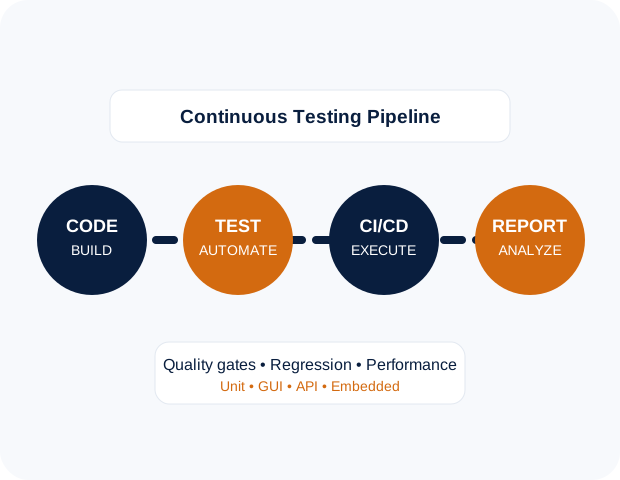
Enterprise Software Testing Solutions from Meteonic
Meteonic helps organizations evaluate and deploy enterprise testing technologies across performance testing, GUI automation, unit and integration testing, embedded software validation, continuous testing and intelligent automation.
With 18+ years of experience and 300+ unique clients including Fortune 500 organizations, Meteonic supports engineering, QA, DevOps and technology teams with enterprise-focused solutions.
Whether your priority is reducing regression effort, validating application performance, automating GUI workflows, testing embedded C/C++ software or connecting testing with CI/CD, we can help map the right testing capability to your environment.
Software Testing Topics We Cover
Frequently Asked Questions About Software Testing Tools
Need the Right Software Testing Tools for Your Enterprise?
Tell us what you are testing—web applications, APIs, desktop software, embedded C/C++, performance workloads or enterprise workflows—and we can help define the right testing approach.